
We may earn a commission if you buy through our Pagewheel link at pagewheel.com. You do not pay extra. The offer notes live at affiliatesmanual.com/offer. Prices stay tied to the page that printed them. If this guide and a checkout disagree, the billing screen wins.
Start with the offer, not the editor
An author I was helping had approval to promote a public-speaking course for new managers. The vendor page was long. Her readers were still reading slides off the screen in Monday standups. She needed a short page in her own words, then a button to the tracked URL.
That is the whole job behind how to create an affiliate bridge page. Name the reader, say who should skip the course, disclose the link, and send the click. A template does not know what a bad standup sounds like.
I keep this affiliate bridge page tutorial next to a fact list: price on the vendor page, refund window, who it is for, and the exact URL the program gave you. If any of those are missing, you are not ready to design.
Write the page before you pick a tool
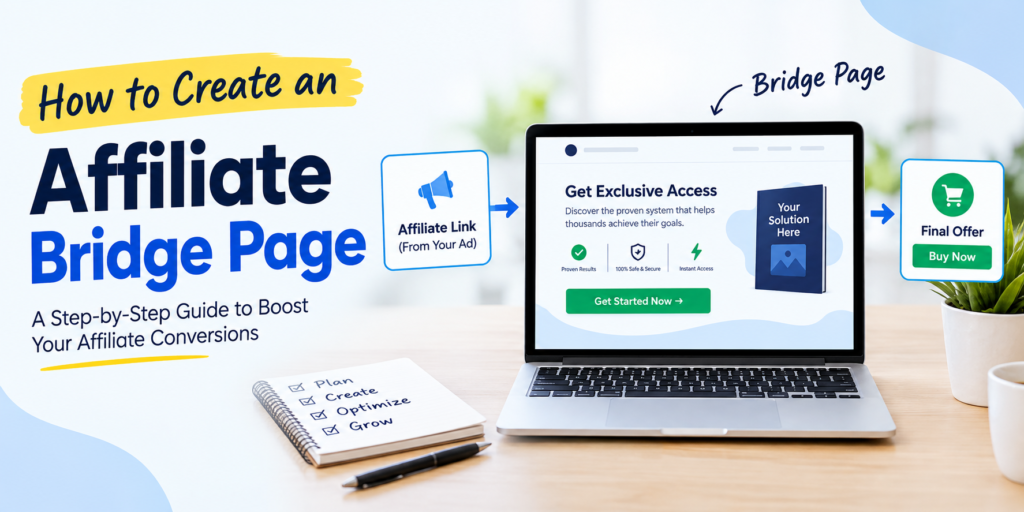
Here is the order I use. It is an affiliate bridge page tutorial, not a design class.
- Paste the approved URL into a note, with the tracking parameters.
- Write one sentence on who the course helps and one on who should leave.
- Draft a disclosure a stranger can read without a law degree.
- Add one example from your own work. Do not paste a vendor testimonial.
- Put a single button under that example.
- Read it on a phone. If the button is hard to tap, fix the layout.
A bridge page template can hold those blocks. It should not supply the sentences. Pagewheel’s main site, checked October 9, 2026, cites 100+ templates. A separate sales page cites about 30+. Use whichever library is actually in the account, then delete the lines that sound like the vendor.
People also call this an affiliate pre-sell page. Same asset. You are not the checkout. You are the person who explains the room the reader is in, then points.
Where the page sits in a bridge page funnel
A bridge page funnel can be one URL. The reader hits your page and clicks through. That is enough for the speaking course, because the vendor already emails buyers.
A longer bridge page funnel adds a step you host. An opt-in page, a short note, then the click. Build that only if the note teaches something the vendor skipped, such as how to open a meeting when you are the new manager and nobody wants another icebreaker. If you will not send the note within a week, skip the form.
An affiliate funnel is the name for that longer path. Do not buy one because a roundup told you to. Match the path to the promise. One button is not a five-email machine.
An affiliate landing page can be this same pre-sell under a different name. I use “bridge” when the click leaves your site, and “landing” when you might keep the address. The speaking promo leaves.
Put it on a host you can edit Thursday
On pagewheel.com, checked October 9, 2026, you can build before you pay. Hosting is $10 a month for one live page, a custom domain, and Stripe or PayPal. The $47 plan covers unlimited pages, advanced funnels, email capture, and priority support. A separate sales page says seven days, then $47 a month. I would use the $10 line for this single page, and I would read the billing screen before I assume a trial.
The Digistore24 affiliate offer, advertised rather than lab-checked, says $10 a month for one sales page and one complete funnel, then $47 for the full plan. It also advertises secure hosting, SSL, Stripe checkout, thank-you and delivery pages, welcome emails, a 30-day money-back line, and a 7,000+ community with weekly calls. I have not sat in the calls. A registrar bill and processor fees sit outside the subscription.
PlainSaaS, dated October 4, 2026, described an order form at $47 up front and $47 a month with no trial on that form. That is a third story. Open the screen that will charge the card. This is still how to create an affiliate bridge page: the tool is the last choice, after the sentences exist.
Systeme.io’s compare page, updated April 2026, lists a free plan with 2,000 contacts, 3 funnels, 1 course, 1 affiliate program, unlimited email, and no card. That is a fair host if you want the opt-in page now and email later. ClickFunnels Launch was printed at $97 a month or $970 a year by Swipe Pages on September 22, 2026. I would not pay that to park one button.
| Step | What you put on the page | What you leave off |
|---|---|---|
| Reader | New managers who read slides aloud | A generic “anyone who speaks” |
| Proof | One standup you actually watched | Vendor income claims |
| Disclosure | You may earn a commission, reader pays the same | Fine print in a footer only |
| Action | One button to the approved URL | Three competing offers |
| Follow-up | A note you will really send | An opt-in page with no email |
Publish, then test the click
How to create an affiliate bridge page includes the boring pass after the draft looks done. Open the button. Confirm the domain and the tracking. Send yourself the click from a phone. Read the first screen out loud. If you stumble, the sentence is too long.
Unpublish if the vendor changes the bonus. A stale page keeps sending people. I would rather have a login I can open on a Thursday than a stack that needs a developer to pause.
Do not copy the vendor sales page. Many programs restrict it, and a duplicate gives the reader no reason to start with you. Do not bid on the brand unless the terms allow it. Do not invent a conversion rate. I will not quote an income screenshot as a fact.
If you want the host I would open for this page, start at pagewheel.com and read the $10 plan. The same offer is described at affiliatesmanual.com/offer. You do not pay extra if a commission is earned.
How to create an affiliate bridge page is mostly editing. The speaking example, the skip line, and the href. The editor just has to hold them on a domain you control.
A second look at the sentences
I rewrite the first screen until a new manager could repeat it. “This course is for people who run the Monday meeting and still read the slides.” That line does more than a feature list. The skip line sits under it: if you already coach speakers for a living, this is the wrong class.
The disclosure sits above the button, not in a footer. I use plain words. We may earn a commission. You do not pay extra. Then the button label says where it goes, such as “See the speaking course,” not “Click here.”
An affiliate pre-sell page fails when it argues with the vendor page. If their refund window is 30 days, do not write 60 because it sounds kinder. Check the page you will link, on the day you publish. Offers move.
This is also where a bridge page template earns its keep. Headline, story, skip line, disclosure, button. Five blocks. If the template has a countdown you cannot justify, remove it. If it has three columns of icons, remove those too. The nurse on a night shift was a different promo. This reader has a Monday meeting. Write for that room.
How to create an affiliate bridge page, once the blocks exist, is a publishing task. Connect the domain if you have one. The $10 Pagewheel description includes a custom domain. The registrar is a separate bill. A subdomain you do not control is a weak place to send a manager you want to trust.
Read the page at arm’s length on a phone. If the button sits under a fold of testimonials you did not write, cut the testimonials. Your example is the standup. One is enough.
After the first live click
How to create an affiliate bridge page does not end when the editor says published. I click the button, I read the vendor page that opens, and I check that the tracking string is still there. Then I wait a day and read my own first screen again. The line that felt clever at night often sounds vague in the morning.
An affiliate landing page you keep for your own workshop is a later project. This promo sends the manager away. An affiliate funnel starts only if you promised a note before that exit. I would not add the note to look complete. I would add it when I can teach the opening line of a meeting in four sentences the vendor never wrote.
How to create an affiliate bridge page on a $10 host is enough for that shape. The $47 plan is the one I reopen if a second offer needs its own page and its own email. I do not run two offers on one URL and hope the button can point at both. One reader, one course, one href.
I also write down the refund window in the fact list and leave it off the page unless I am sure I have the current number. Quoting a stale 30 days when the vendor moved to 14 is how a helpful bridge page becomes a complaint. Check on publish day. How to create an affiliate bridge page includes that check, every time the bonus or the price moves.
If a friend asks for the short version, I say this: fact list, four sentences, disclosure, one button, phone pass. That is how to create an affiliate bridge page without a developer and without a $97 suite. The speaking course is still the vendor’s. Your page is the reason a new manager trusts the click.
FAQ
How do I start an affiliate bridge page if I have never published one?
Write the fact list first: vendor price, refund window, who it is for, and the approved URL. Then draft the reader, the skip line, and the disclosure before you open a template. How to create an affiliate bridge page is that sequence, then a host. On pagewheel.com, checked October 9, 2026, one live page is $10 a month with a custom domain and Stripe or PayPal.
Where should the disclosure sit?
Put it near the top, in sentences a stranger can read. How to create an affiliate bridge page with the disclosure in a footer is how people feel misled after the click. Say that you may earn a commission and that the reader does not pay extra. The button still has to go to the program’s URL, with their tracking.
Do I need an opt-in page before the vendor click?
Only if you will send a useful note within a few days. The speaking vendor already emails buyers, so I would skip the form unless I had a real tip about opening a meeting. An opt-in page with no follow-up is extra compliance and no help. Systeme.io’s April 2026 free plan includes unlimited email and 2,000 contacts if you do take that path.
Can I paste the vendor’s sales copy?
No. Write your own example and keep their claims off your page unless you have checked them and the program allows the wording. A duplicate gives the reader no reason to begin with you, and many programs restrict copying. If the terms are unclear, ask the affiliate manager before you publish.
What does it cost to host one bridge page?
Read the screen that will bill you. How to create an affiliate bridge page on Pagewheel’s main site, as of October 9, 2026, can sit on the $10 a month plan for one live page. The $47 plan adds unlimited pages, advanced funnels, email capture, and priority support. A separate sales page advertises seven days, then $47 a month, so confirm which offer the checkout is actually selling.